To create jsp file you can use the simple text editor or IDE for creating the jsp files. I will suggest you to use the Dreamweaver. In Dreamweaver you can simply create the jsp file with preview of created jsp files.
After create jsp files put all the jsp files in one folder.
start the sun application server and open the Deployment tool. With the help of Deployment you can create the web application archive file and also deploy your jsp files to server which is run in your local-host. After open deployment tool Connect to server sub-window is opened in this enter user name and password which is same as the when the sun server is installed.

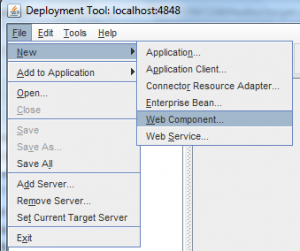
After that the create new web component or if you previously created web application archive then open it . To create new web component click on file tab then new and select web component.
After that click on next and the following window is opened

In this window red color option fill and click on next. In context root please fill the name after / symbol.
After that select one jsp file and click on finish.
Created module is listed in deployment tool window in file section.
select module and click on deploy button in deployment tool window.
After that open Admin console and Log-in with user name and password which is same as the when installation of server entered.
And click on web application tab here the deployed item is shown.
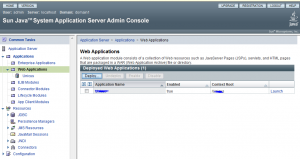
Click on Launch.
Your browser is opened and your web application is run.
For better understand to run jsp file and creation war file watch this video.
About The Author

bkd
Bharat Kumar Dhaker Founder and Editor of ComputerSciencearticle.in, He is an Engineering[Computer Science] Student From Rajasthan. He has a knowledge of C, C++, Java, Adv. Java, HTML and little bit knowledge of PHP.


Your comment is deleted because of the it content a external links.
Here you can't post any external links.
Thank you.